Android Spyware 2025
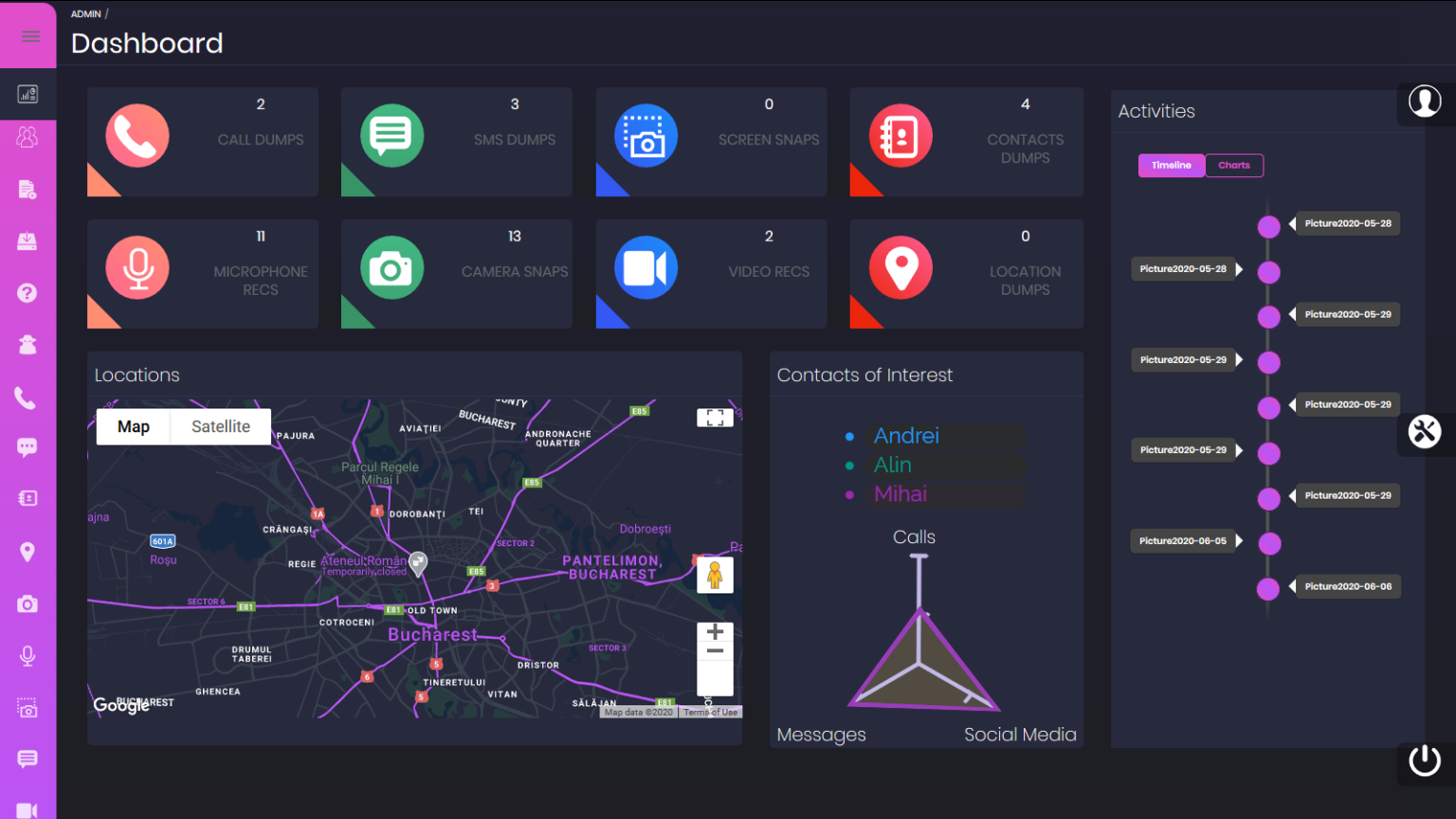
Discover Android Spyware 2025, an open-source Rails-based command and control tool for educational Android device spying using Metasploit and ADB. Learn installation, features, and ethical usage in this detailed guide
In the world of cybersecurity education, tools like Android Spyware stand out as powerful resources for learning ethical hacking and device forensics. Developed as a Rails command and control (C&C) web application, Android Spyware 2025 leverages the Metasploit framework and Android Debug Bridge (ADB) to simulate spyware functionalities on Android devices. This isn’t just another hacking script—it’s a full-fledged educational platform designed for developers, security researchers, and students to explore mobile vulnerabilities in a controlled environment.
Whether you’re diving into penetration testing or simply curious about how spyware operates behind the scenes, this guide breaks down everything you need to know about Android Spyware. From its core features to step-by-step installation, we’ll cover it all while emphasizing its strictly educational intent. Remember, using such tools on real devices without consent is illegal—always prioritize ethics in your learning journey.
Android Spyware 2025 is an open-source project built on Ruby on Rails, serving as a web-based dashboard for monitoring and interacting with Android devices. At its heart, it combines the robustness of Metasploit for payload generation and execution with ADB for direct device commands, all wrapped in a user-friendly GUI.
This tool simulates a Kali Linux environment via Docker containers, making it accessible even on non-Linux systems like Windows. It’s perfect for educational purposes, such as teaching students about mobile security threats or helping pentesters prototype spyware defenses. The project repository includes everything from source code to deployment scripts, encouraging users to fork, modify, and contribute.
Key highlights include: Educational Focus: Designed to demystify spyware mechanics without promoting real-world misuse. Cross-Platform Compatibility: Runs on Windows, macOS, and Linux with minimal setup. Modular Design: Separate modules for Metasploit RPC integration and ADB interactions.
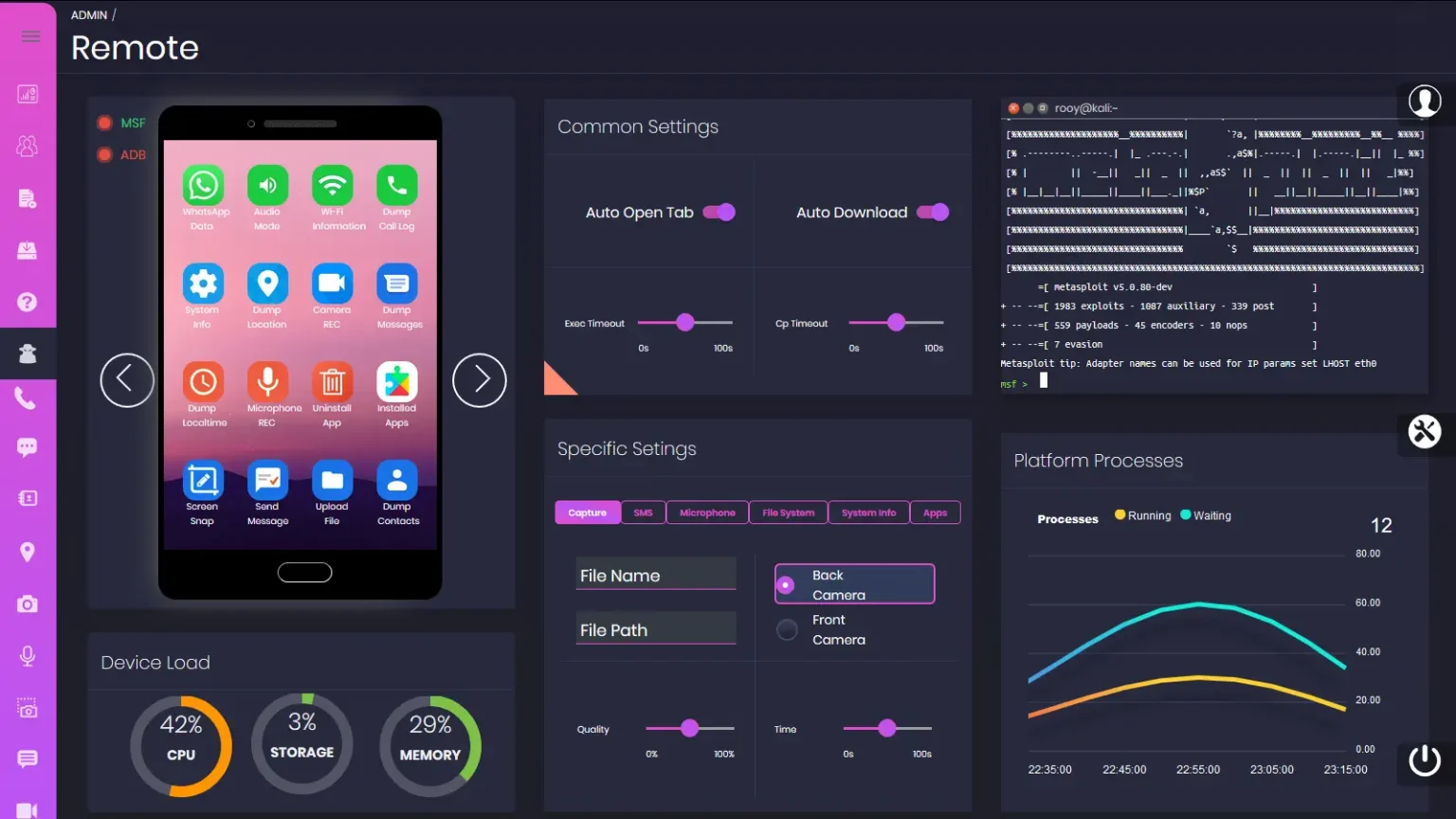
Metasploit-Driven Actions Leveraging Metasploit’s API via RPC calls, Android Spyware 2025 enables a suite of remote commands. Here’s a breakdown of the most useful ones:
System and Device Intelligence Gathering: Dump system info, local time, call logs, contacts, and installed apps to analyze device state. Location and Media Capture: Track GPS location, snap webcam photos, or stream live video for simulated surveillance scenarios. Communication Interception: Extract messages and enable microphone recording (limited to Android versions below 9.0 for compatibility). Device Manipulation: Lock/unlock the screen, change audio modes, send SMS, open or install apps, and even run shell commands. Stealth Options: Hide or show the payload app icon, plus uninstall capabilities for clean testing.
The combination ensures comprehensive coverage: Metasploit handles wireless payloads, while ADB provides wired precision. Outputs from all actions are logged in a dedicated files directory, making it easy to review dumps and recordings post-session.
Step-by-Step Installation and Deployment Guide
Getting Android Spyware 2025 up and running is straightforward, thanks to Docker’s containerization. This setup isolates dependencies, ensuring a clean Kali-like environment without cluttering your host machine.
Prerequisites
Before diving in, ensure you have:
Docker and Docker Compose installed. ADB (Android Debug Bridge) version 1.0.39 or compatible—install via Chocolatey on Windows. Basic knowledge of networking (e.g., finding your LAN IP) and Docker.
Installation Steps
Follow these numbered steps to set up the tool:
Install ADB: Open an elevated PowerShell (Run as Administrator) and execute: choco install adb –version=1.0.39. Create Project Directory: Make a new folder and download the Docker Compose file using curl: curl https://raw.githubusercontent.com/CanciuCostin/android-spyware/master/docker/docker-compose.yml -o docker-compose.yml. Pull Docker Images: Run docker-compose pull to fetch the required containers, including Metasploit and Rails components. Start ADB Server: In a command prompt, type adb server to initialize the bridge.
Deployment Process Optional Configuration: Edit the Docker Compose file to add your Google Maps API key for location visualization. Launch Containers: Navigate to your project directory and run docker-compose up. Wait for initialization (usually 2-5 minutes). Access the Dashboard: Open your browser to http://localhost/admin. Log in with default credentials: username [email protected], password password. Files Setup: A files directory auto-creates in your project path for payloads and outputs.
For local development without Docker, clone the repo, install Bundler and Yarn, set environment variables like ANDROIDSPYWARE_DATABASE_HOST=localhost, and run rails server. Use PostgreSQL rake tasks for database setup if needed.
How to Use Android Spyware: From APK Generation to Action Execution
Once deployed, using Android Spyware 2025 is intuitive. The web GUI guides you through payload creation, installation, and control.
Generating and Installing Payloads Find Your IP: Use ipconfig (Windows) to note your LAN IP. Create APK: Navigate to the Payloads section, select port 4444, enter your IP, and name the APK. It generates in /files/payloads. Install on Device: In APK Installations, select the APK and target (USB for plugged-in devices). Approve any on-device prompts.
Executing Remote Actions Connect Device: Open the payload app on the Android device. Watch for green MSF and ADB lights on the Remote page. Run Commands: Click icons on the device widget to trigger actions like webcam snaps or file pulls. View live output in the terminal widget. Review Results: All dumps save to /files/dumps for offline analysis. This workflow is ideal for classroom demos or personal labs, where you can iterate on payloads without risking production environments.
Troubleshooting Common Issues in Android Spyware 2025 Setup
Even with Docker’s simplicity, hiccups can occur. Here’s how to debug:
No Green Lights on Remote Page: Verify APK IP matches your machine’s, allow firewall ports (2222, 3333, 4444), and test container-host connectivity (try gateway.docker.internal or docker.host.internal in configs). ADB Failures: Restart with adb kill-server followed by adb server; confirm USB debugging is on. Connection Blocks: Ensure the device and host are on the same LAN; test web access to http://[your-ip]:2222 for MSF filesystem.
For deeper dives, inspect the source code—it’s MIT-licensed and well-commented.
Ethical Considerations: Why Android Spyware is for Education Only
Android Spyware 2025 disclaimer is clear: this is for learning, not malice. Real-world spying violates privacy laws like GDPR or the Computer Fraud and Abuse Act. Use it to build defenses—study how payloads evade detection, then develop countermeasures like app sandboxing or anomaly-based alerts. By demystifying threats, tools like this empower users to create safer digital ecosystems.
Download 1 Download 2 Download 3